
Star Wars MTG Proxy Resources for Custom Decks
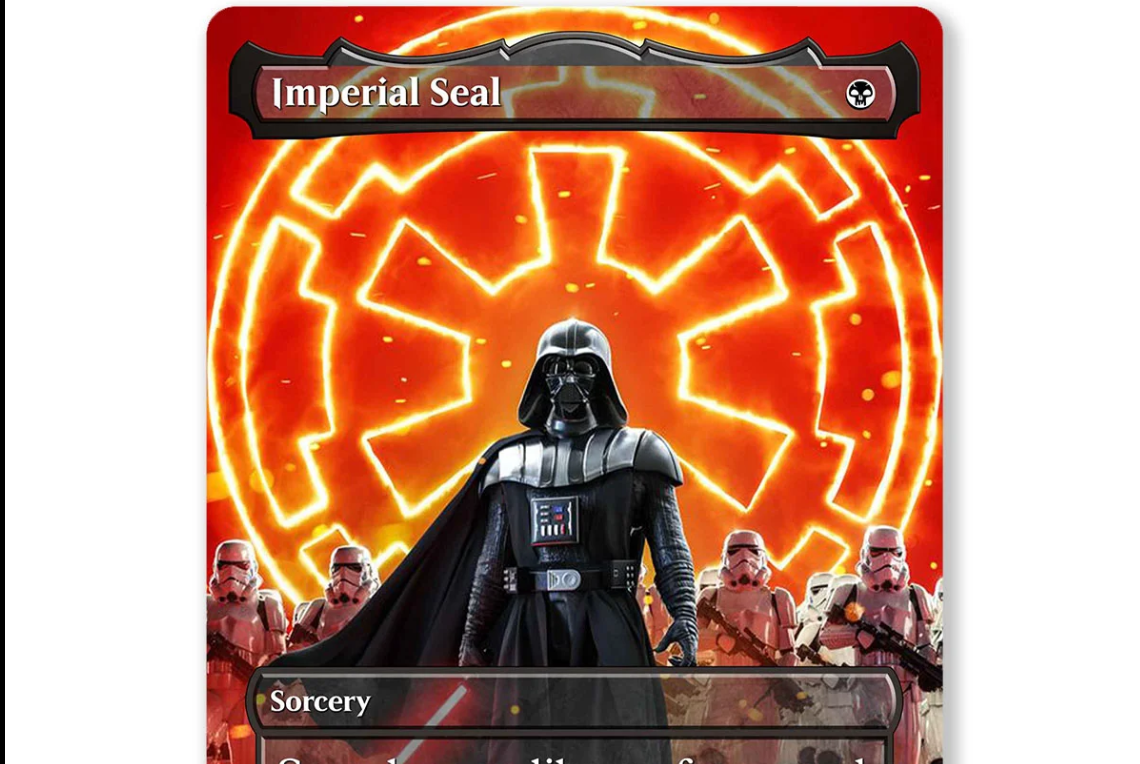
Table of Contents
Star Wars MTG proxy resources are a lot better now than they used to be. A few years ago, building a full Star Wars Commander deck usually meant cobbling together random renders, squinting at fonts, and hoping your printer did not turn Tatooine into a beige soup. Now there are actual tools, live communities, and ready-made singles that make the process much smoother. If you want the short version, my favorite place to start is the PrintMTG custom card creator tool because it lets you move from idea to finished card without turning the whole thing into a side quest.
That matters more than people think. A Star Wars deck only feels good when it looks intentional. Darth Vader can absolutely lead the table. Luke, Mandalorians, bounty hunters, Sith artifacts, even planet-themed lands all work. But if the frames clash, the text is hard to read, and half the deck looks like one creator while the other half looks like a different universe, the whole thing starts to feel messy fast.
Why Star Wars Works So Well for MTG Proxies
Star Wars is one of the easiest themes to map onto Magic because the roles already make sense. Big villains become commanders or finishers. Jedi slide neatly into legends, knights, or value engines. Troopers, droids, bounty hunters, rebels, and ships all have obvious homes in existing MTG shells. Even the support pieces are fun to theme. A mana rock can become a holocron. Removal can become Force lightning. Lands can become planets, bases, or star systems.
And that is why people keep building these decks. You are not just replacing art. You are reskinning an entire game experience. A good Star Wars proxy deck feels like its own product. A bad one feels like three Pinterest boards got shuffled together.
If you want help making the whole deck look consistent, this guide on How to Build a Themed MTG Commander Deck That Looks Like One Set is worth reading before you commit to 100 different art choices.
Best Resource for Building From Scratch: PrintMTG Card Maker
If you want to actually create Star Wars proxies, the PrintMTG custom card creator tool is the best starting point I’d recommend right now.
The big reason is workflow. PrintMTG lets you search MTG cards to pre-fill core details like the name, mana cost, type line, rules text, artist, and art, then you can overwrite whatever you want, adjust the art placement, and switch between frame templates like Modern, Vintage, Box Topper, Mystical Archives, and Full Art. That is a nice setup for Star Wars builds because most people are not inventing brand new rules text. They are reskinning real Magic cards and want a fast way to swap art, pick a frame, and keep moving.
I also like that it closes the gap between design and printing. A lot of builders are good at mockups, but then you still need to export, organize files, and send them somewhere else. PrintMTG is cleaner because the design flow and the printing path already live in the same ecosystem. If your goal is a themed Commander deck, that saves time and cuts down on dumb mistakes.
https://trinketkingdom.com/shop/imperial-seal-star-wars-full-art-custom-mtg-proxy-card/
There is another practical reason to use it. Star Wars decks usually need consistency more than raw novelty. You need the same frame family, similar text treatment, and art that does not fight the layout. The PrintMTG tool makes that easier because you can build the commander, the staple package, the lands, and the flashy mythics in one place instead of bouncing across tools and ending up with accidental chaos.
If you already have a decklist, the broader PrintMTG proxy workflow also lets you start from a list, browse set printings, or work from precon-style starting points. That gives you a few ways into the same end result, which is helpful when you are deciding whether you want a full custom build or just a handful of Star Wars showcase cards. Read.
Community Star Wars MTG Proxy Resources That Actually Help
Not every Star Wars proxy project needs to start from a blank page. Sometimes the best move is seeing what other people have already built.
The first place I would check is r/magicproxies. It is still one of the most useful places for actual inspiration instead of generic advice. And more importantly, Star Wars builds are actively showing up there. Recent and recent-ish threads include a full Darth Vader EDH deck called “Rule the Galaxy,” an Isshin-based Star Wars reskin deck, update posts for Star Wars-themed Commander projects, and collections of Star Wars commanders and tokens. That tells you two things. First, the interest is not theoretical. Second, you can often find card mapping ideas faster by browsing existing builds than by starting from zero.
This is especially helpful when you are stuck on the middle of the deck. Commanders are easy. Signature cards are easy. It is the card draw slots, mana rocks, lands, and filler creatures where people lose steam. Community builds help solve that.
The other useful community-driven option is MPC Autofill, usually called MPCFill. It is open source, community-driven, and built around choosing renders from shared image databases, editing a project, and then using a desktop tool to automate ordering with MakePlayingCards. I would not call it the simplest option for a brand-new player, but it is still one of the better Star Wars MTG proxy resources if you want a full batch workflow and like browsing community-made renders at scale.
That is really the dividing line. If you want the easiest custom builder, use PrintMTG. If you want to rummage through community-created render libraries and tune a big batch project, MPCFill is still relevant.
Other Builders Worth Knowing About
Even though PrintMTG is my top recommendation here, a couple of other tools are still worth knowing.
MTG Cardsmith is good for quick mockups and creative concepts. It is simple, well-known, and still useful when you want to test an idea fast or share a concept card with someone before you worry about printing. I would not make it my first choice for a full polished Star Wars Commander deck, but it is handy when you are in that “what if Boba Fett was actually this card?” stage.
MTGCardBuilder is the more feature-heavy alternative. It positions itself as a free custom MTG card creator, supports lots of frames, and emphasizes high-resolution output. That makes it a good backup when you want extra frame experimentation or a community gallery to browse for style ideas.
And for rules text checking, Scryfall is still the easiest place to confirm card names, search text, and Oracle wording before you commit a render. That sounds boring, but it saves a lot of cleanup later. Nothing kills the illusion faster than a beautiful Star Wars proxy with the wrong text copied onto it.
When Ready-Made Star Wars Singles Make More Sense
Sometimes you do not want to build 100 cards. You just want the cool cards.
That is where ready-made singles make more sense than a full DIY job. If you only want a Darth Vader commander, a themed Imperial Seal, a Star Wars Dark Confidant, or a few signature staples for an otherwise normal deck, buying finished singles is much easier than designing the whole package yourself.
That is also part of why Trinket Kingdom works well as a companion option to the PrintMTG builder path. PrintMTG is the place I would use to build a fresh custom deck from scratch. Trinket Kingdom makes more sense when you want curated Star Wars singles already living in the catalog, especially if you prefer choosing finished cards instead of laying out each one yourself.
And if you are new to ordering printed proxies in general, How to Order Custom MTG Proxies Online is a good follow-up read. It covers the part people usually pretend is obvious until they hit checkout and start second-guessing everything.
How To Make Star Wars Proxies Look Good on the Table
This part gets skipped way too often.
The best Star Wars MTG proxy resources help you make cards. They do not automatically help you make a deck that plays cleanly. Those are two different problems.
The trick is to theme the deck in layers. Start with your commander and a small package of signature cards. Then do the staples. Then do the lands. Then worry about the last fifteen flex slots. If you start with the splashiest cards and ignore the foundation, the deck ends up looking half-finished. A matching land package and staple package does more for visual cohesion than one perfect commander render ever will.
You also want to keep the card readable. In my opinion, this is where a lot of themed decks fall apart. People get excited about dramatic art, dark backgrounds, or ultra-busy frame treatments, and suddenly nobody at the table can read the mana cost or rules box. Star Wars cards look best when the theme is strong but the game information still wins.
That means using one or two frame systems instead of six. It means keeping text contrast high. It means not turning every card into a poster. And it means being honest about what should be full art and what should stay clean. Your commander can be flashy. Your Rhystic Study still needs to be readable.
A good rule is simple: build the deck so it still works when someone across the table has never seen your custom cards before. If they can understand what is going on without asking every turn, you nailed it.
Final Thoughts
If you are sorting through Star Wars MTG proxy resources right now, i’d keep it simple.
Use PrintMTG if you want the cleanest way to build custom cards and move toward printing without fighting your tools. Use r/magicproxies if you want real deck examples, shared ideas, and proof that other players are actively building Star Wars Commander projects. Use MPCFill if you want the big community-render route for full-deck projects. Keep MTG Cardsmith and MTGCardBuilder in your back pocket for concepting and alternate layouts. And if you only want a few finished cards instead of a whole design project, look at curated Star Wars singles on Trinket Kingdom.
That combination gives you the best of both worlds. You can browse ideas, build smarter, print cleaner, and end up with a deck that actually feels like Star Wars instead of just wearing a helmet.